Terminal service configuration in Windows 2000/2003 Server
Terminal service can be configured by the Terminal Services Configuration tool, one of Administrative tools. Below there are some screenshots of RDP-Tcp connection properties.

Encryption Level Low. The lower encryption level, the faster terminals work.
You should set flag "Use standart Windows authentication" to off, otherwise automatic replacement of the login/password from the configuration file won't work.
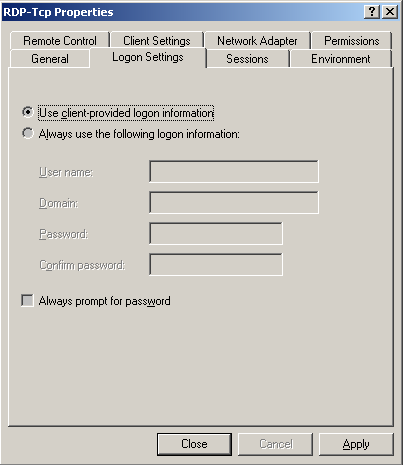
Choose by radiobuttons "Use client-provided logon information". Set flag "Always prompt for password" to off, otherwise automatic replacement of the login/password from the configuration file won't work.

These settings are by default and I consider them quite correct.

If all terminal server users should work with the same program, you should configure this setting. Otherwise it's better not to touch it.

These settings were determined after long work with the terminal solution in one large company. They can be explained in such way: the remote administration (exactly administration, not spying) is allowed, for it's convenient to the techsupport team. But for management should be received the user permission, it helps a user not to fear and understand better, when his computer is managed by a techsupport member.

This helps not to limit any Windows 2003 Server capabilities. You can limit something for the system safety, but the main point — not to forget about applied limitations by yourself.

Similar to previous screen. This are highly specialized restrictions, that can strongly complicate the issue in case of thoughtless use.
Useful
- Add your own message to the "Windows logon" window. It's extremely usefull if you have several terminal servers. And also it can be used as a little memo to a user to remind, that the terminal can be switched off only when the logon invitation is on the screen:
HKLM\Software\Microsoft\Windows NT\CurrentVersion\Winlogon\- key
Welcome, typeREG_SZ, value "terminal server <computer_name>" - key
LogonPrompt, typeREG_SZ, value "Input YOUR user name and password. Now it's possible to turn off computer If you want to stop work."
- key
- Start explorer (or any other application if a client needs so) after the end of the login-script work.
This allows to set disks, connected in the logon-script, as the working directory . Of course it's usefull only if you have the logon-script, that connects network disks.
HKLM\Software\Microsoft\Windows NT\CurrentVersion\Winlogon\- key
RunLogonScriptSync, typeREG_SZ, value "1"
- key